v0.9.0 — Rust · Cross-platform

See everything.
Send nothing.

A passive vulnerability scanner written in Rust that discovers hosts, identifies applications, operating systems, and databases, and matches against 200k+ CVEs — by listening to traffic you already have.

nopack — passive scan
$ nopack --pcap capture.pcap --server

+---------------------------------------------------+
| nopack v0.9.0 |
| TCP/UDP Fingerprinting | PCAP & Live |
| NVD 2.0 | CPE | EPSS | CISA KEV | EOL |
+---------------------------------------------------+

Phase 1: Parsing capture.pcap...
Done: Captured 247,831 packets, discovered 42 hosts
SMB: Extracted Windows metadata from 8 hosts
SSH: Identified OpenSSH versions on 12 hosts
TLS: Parsed 18 certificates (2 self-signed)
Mail: FTP (3), SMTP (4), IMAP/POP3 (5) server versions extracted
SNMP: sysDescr from 6 devices (Cisco IOS, Linux, FortiOS)
DHCP: Hostnames and vendor class from 15 clients
LLDP: 4 switches identified (Cisco IOS, Juniper JunOS)
OSPF: 6 routers, 2 areas, 8 adjacencies
Phase 2: Running service fingerprinting...
Sigs: Matched 89 services (MySQL 8.0.36, Redis 7.2.4, Dovecot 2.3.19, ...)
TCP SYN: OS fingerprinted 31 hosts (Windows 10, Linux, macOS, Android)
OUI: Vendor identified for 38 MACs (Cisco, VMware, HP, Apple, ...)
Phase 3: Parsing headers & update traffic...
UA: Parsed 23 software components from User-Agent strings
HTTP: Parsed 14 software components from Server headers
APT: Detected 9 packages from update traffic (libssl3, curl, nginx)
Phase 4: Checking built-in vulnerability database...
Phase 5: Loading NIST NVD 2.0 data...
NVD: Loaded 234,519 CVEs — matched 47 vulnerabilities
Phase 6: Enriched 47 vulnerabilities with EPSS scores
Phase 7: Loading CISA KEV catalog...
KEV: 6 vulnerabilities flagged as actively exploited
Phase 8: EOL detection...
EOL: 20 end-of-life software findings

Server: Web UI listening on http://127.0.0.1:8080
Dashboard: http://127.0.0.1:8080/
CVE Browser: http://127.0.0.1:8080/cve/
API: http://127.0.0.1:8080/api/stats
$
190+
Service Signatures
200k+
NVD CVEs Matched
130+
CPE Product Mappings
129
Bot Signatures
110+
Server Products
80+
EOL Products Tracked
16
REST API Endpoints
0
Packets Sent

2-minute demo

Load a PCAP, browse hosts, explore vulnerabilities, and navigate the topology map.

What you get

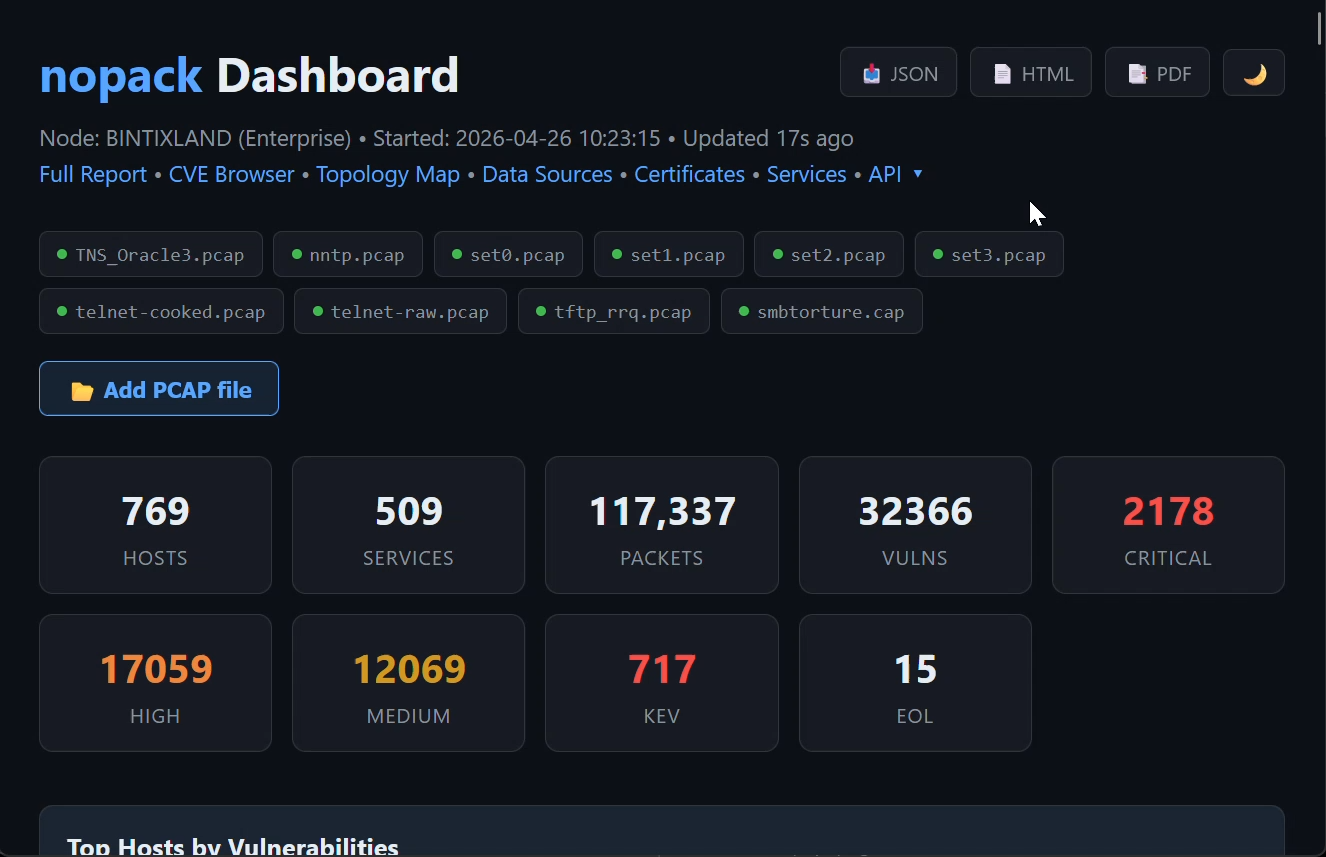
nopack Dashboard
Dashboard — hosts, services, vulnerabilities at a glance
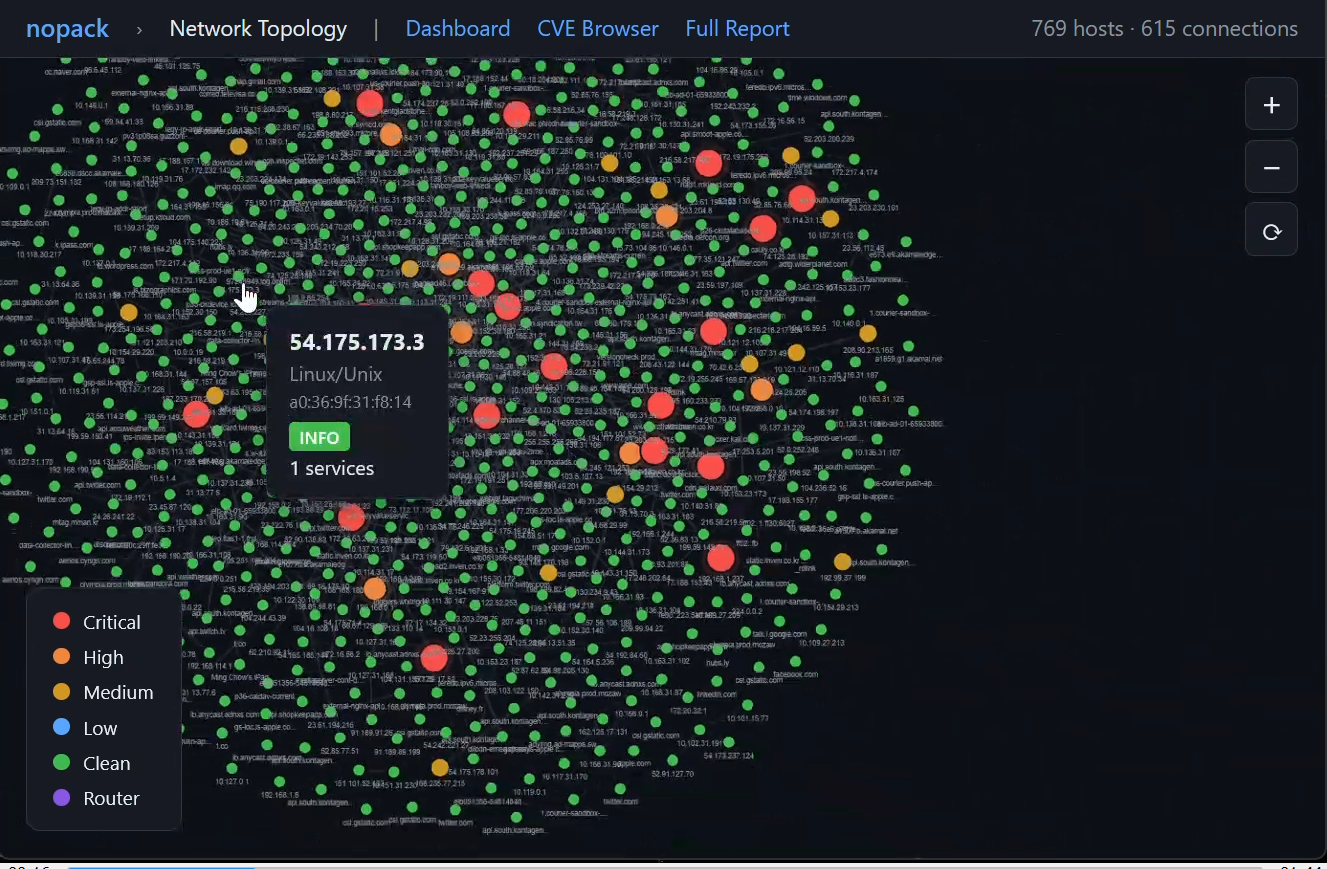
Network Topology
Network Topology — color-coded by risk severity
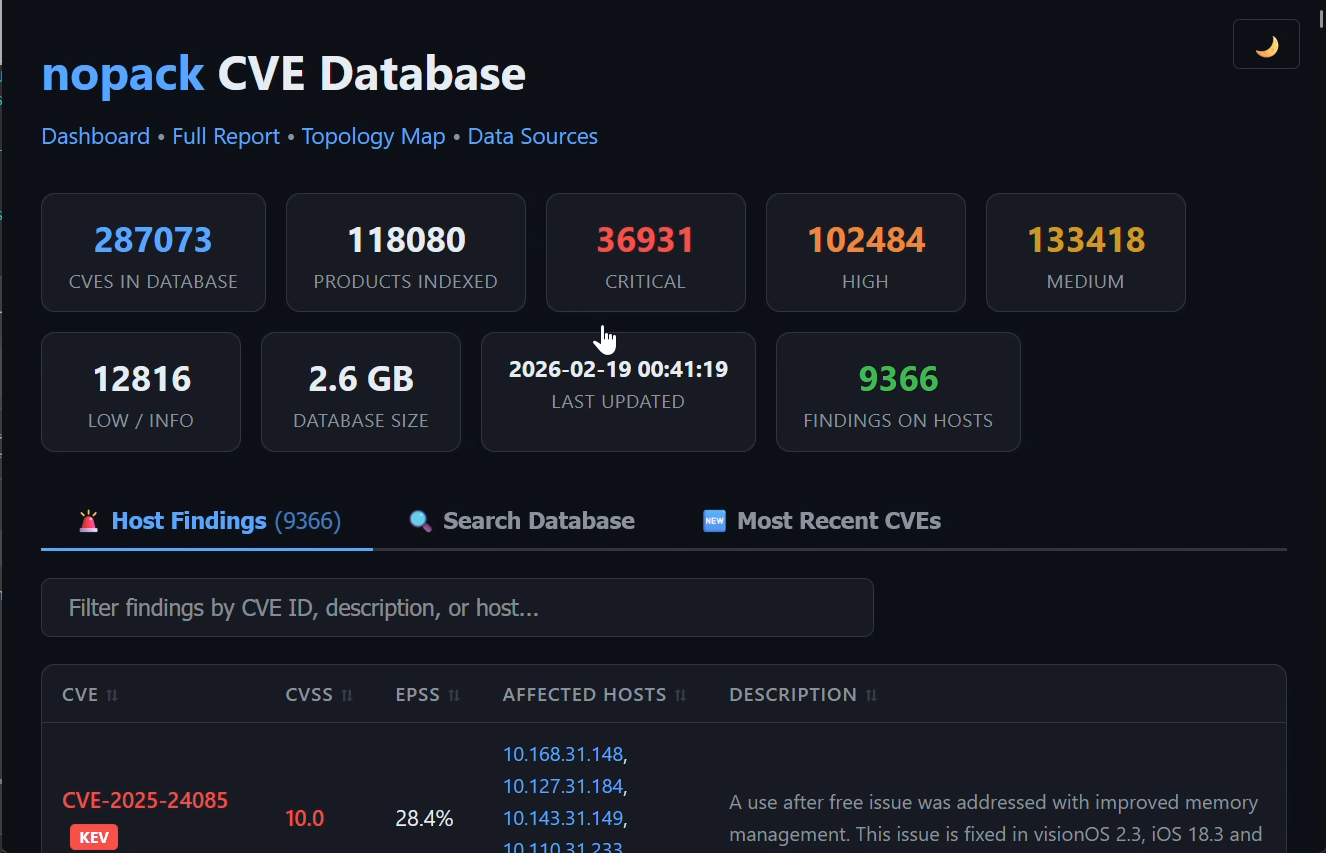
CVE Database Browser
CVE Browser — 287K CVEs searchable with EPSS & KEV
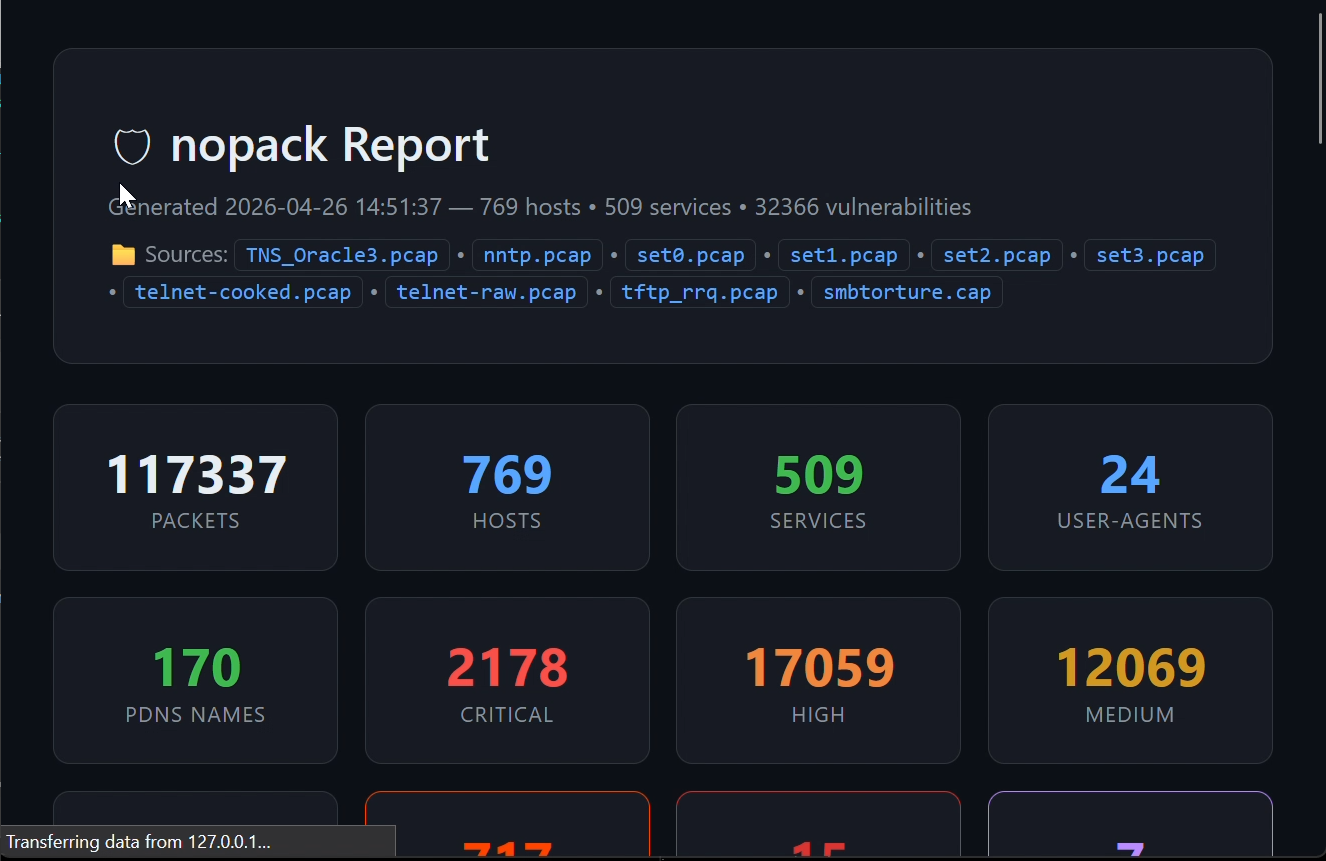
HTML Report
HTML Report — shareable, self-contained vulnerability report

Everything passive.
Nothing missed.

nopack extracts an extraordinary amount of intelligence from traffic you already have — PCAP files, live capture, or both.

🔍
Network Discovery
Read PCAP/PCAPNG files (including gzip) or capture live traffic. 20+ passive identification techniques: TCP SYN fingerprinting (p0f-style), DHCP fingerprinting (vendor class + option 55 PRL), OUI/MAC vendor lookup (400+ vendors), SSH banners, SMB, SNMP sysDescr, SSDP/UPnP, LLDP, CDP, NBNS, mDNS, IGMP multicast, and TLS certificates. Reconstruct DNS from 7 sources.
PCAP PCAPNG Live Capture BPF Filters Passive DNS ARP Detection Traceroute MAC OUI Lookup 20+ ID Sources
🎯
Service Fingerprinting
190+ TCP/UDP banner signatures plus 25+ dedicated protocol parsers. Content-based detection on all ports — finds HTTP on 8080, SSH on 2222, MySQL on 3307, TLS on any port. No port assumptions. Extracts exact version strings from protocol handshakes.
Apache Nginx MySQL PostgreSQL Redis Kubernetes Any-Port Detection +180 more
🔐
Protocol-Level Version Detection
Deep packet inspection with dedicated parsers for 30+ protocols. SSH, TLS certificates, MySQL, PostgreSQL, Redis, MongoDB, FTP, SMTP, IMAP, POP3, RDP, LDAP, SIP, SNMP, NTP, Kerberos, RADIUS, RTSP, DHCP, mDNS, SMB, DNS, HTTP, ARP. Plus SSDP/UPnP, LLDP, CDP, NBNS, OSPF, BGP, and IGMP. Content-based detection works on any port.
SSH TLS Certs MySQL PostgreSQL Redis MongoDB FTP SMTP IMAP/POP3 RDP LDAP SIP SNMP NTP Kerberos RADIUS RTSP DHCP mDNS SSDP/UPnP LLDP CDP NBNS OSPF BGP IGMP SMB/CIFS DNS HTTP ARP
💻
HTTP & SMB Intelligence
Parse User-Agent strings to identify browsers, OSes, runtimes, game consoles, smart TVs, and bots. Extract Server and X-Powered-By headers (110+ products). SMB/CIFS parsing for Windows metadata, domains, and signing status.
User-Agent Server Header X-Powered-By 129 Bots SMB/CIFS 110+ Products
⚠️
NVD 2.0 CVE Matching
Match every detected service, User-Agent, and Server header against NIST's National Vulnerability Database. CPE 2.3 parsing with version range comparison and bincode caching.
234k+ CVEs CPE 2.3 Version Ranges CVSS
Threat Intelligence
EPSS exploit probability scoring from FIRST.org. CISA KEV catalog with active exploitation flags, due dates, and ransomware indicators. CWE badges linked to MITRE definitions.
EPSS CISA KEV CWE Ransomware Intel
End-of-Life Detection
80+ built-in EOL rules for Windows, macOS, PHP, Apache, OpenSSL, Node.js, Java, and more. Optional endoflife.date integration downloads fresh data for 50+ products. SMB v1 flagging.
Built-in 80+ Rules endoflife.date SMB v1 Flagging Risk Levels
📄
Reports & Web Dashboard
Interactive HTML with collapsible host cards, activity timeline, searchable views, 40 SVG icons. PDF reports (pure Rust). JSON, CSV, text. Full web dashboard with live stats, CVE browser with detail pages, file browser for loading PCAPs at runtime, one-click export (JSON/HTML/PDF), dark/light theme toggle, and REST API.
HTML JSON CSV Text PDF Web Dashboard CVE Browser File Browser Dark/Light Theme Export REST API
📡
Distributed Mode
Deploy agents across network segments that push findings to a central master server. Shared-secret authentication. Unified dashboard aggregates all agents with per-sensor breakdown.
Agent/Master Shared Secret Auth Unified Dashboard REST API
🧬
Advanced Device Fingerprinting
20+ passive identification techniques that find what other tools miss. TCP SYN fingerprinting (p0f-style) matches OS from window size, MSS, and options order. DHCP option 55 (PRL) fingerprinting. MAC OUI vendor lookup with 400+ embedded prefixes covering VMs, printers, IoT, cameras, and industrial gear. SSDP/UPnP identifies smart TVs, game consoles, Chromecasts, and IoT. LLDP/CDP reveals switch models, firmware, VLANs, and PoE. NBNS for Windows hostnames and domains.
TCP SYN (p0f) DHCP PRL MAC OUI (400+) SSDP/UPnP LLDP CDP NBNS IGMP
🗺️
Routing Protocol Topology
Passively extract network topology from OSPF and BGP traffic. OSPF: router IDs, areas, DR/BDR elections, neighbor adjacencies, link costs from Type 1/2/5 LSAs, external route redistribution. BGP: peer AS numbers, router IDs, capabilities (4-byte AS, MP, graceful restart), AS_PATH, NEXT_HOP, communities, local preference. Turns a SPAN capture into a topology map.
OSPF Hello OSPF LSA BGP OPEN BGP UPDATE AS_PATH Adjacencies Link Costs
📦
Update Traffic Analysis
Passive software inventory from cleartext package manager traffic. Detects downloads from 12 package managers: APT, YUM/DNF, Alpine APK, pip, npm, RubyGems, Go Modules, Cargo, Maven, Composer. Browser auto-update checks reveal Firefox and Chrome versions. Windows Update KB numbers. APT repo metadata identifies OS distribution and version. All detected packages feed into NVD CVE matching automatically.
APT YUM/DNF pip npm RubyGems Go Cargo Maven Browser Updates Windows Update
🖨️
Printer & IoT Detection
Deep parsing for CUPS/IPP, PJL/JetDirect (port 9100), and HTTP management interfaces. Identifies 13+ printer brands: HP, Xerox, Brother, Canon, Epson, Lexmark, Ricoh, Samsung, Kyocera, Konica Minolta, OKI, Sharp, Zebra. Extracts model names and firmware versions. Security camera detection for Hikvision, Dahua, Axis via SSDP and HTTP. All detections auto-match against NVD for CVEs.
CUPS/IPP PJL/JetDirect HP Xerox Brother Canon Epson Lexmark 13+ Brands
🦀
Built with Rust
Fast, safe, and cross-platform. Single binary, no runtime dependencies. Runs natively on Windows, Linux, and macOS (Intel + ARM64). Deploy anywhere from a Raspberry Pi to a data center.
Windows Linux macOS Single Binary ARM64

The pipeline

Eight phases, zero outbound packets. Each phase enriches the next.

PHASE 1 Capture 30+ protocol parsers PCAP / Live / gzip PHASE 2 Fingerprint 190+ signatures TCP SYN / OUI / SSDP / LLDP PHASE 3 Parse & Map UA / Server / SSH → CPE Update traffic analysis PHASE 4 Built-in CVEs ~37 high-confidence quick-match rules PHASE 5 NVD Match 200K+ CVEs CPE 2.3 correlation PHASE 6 EPSS + KEV Exploit probability Active exploits & ransomware PHASE 7 EOL Detection 80+ products tracked endoflife.date PHASE 8 Report HTML / JSON / CSV Dashboard + API DATA SOURCES NVD 2.0 200K+ CVEs EPSS Exploit prediction CISA KEV Active exploits EOL DB 80+ products OUI DB 400+ vendors Signatures 190+ patterns 20+ IDENTIFICATION TECHNIQUES TCP SYN • DHCP PRL • OUI • SSDP/UPnP • LLDP • CDP • NBNS • IGMP • ICMPv6 NDP • SSH • SMB • TLS Certs • SNMP • mDNS • HTTP UA ZERO PACKETS SENT

Distributed mode

Deploy sensors across your network. Aggregate findings on a central master with a unified dashboard and REST API.

MASTER SERVER NVD / EPSS / KEV / EOL Aggregation & Analysis Web Dashboard :8080 REST API BROWSER Dashboard UI TLS + Auth TLS + Auth TLS + Auth AGENT — VLAN 10 Office Network 192.168.10.0/24 ● 47 hosts discovered AGENT — DMZ Public Services 10.0.1.0/24 ● 12 hosts discovered AGENT — CLOUD AWS VPC 172.16.0.0/16 ● 83 hosts discovered SPAN port / tcpdump SPAN / mirror VPC flow / pcap Shared-secret authentication • TLS encryption • Unified dashboard
📡 Master
# Receive-only master (no local capture)
nopack --master --agent-key MySecret123 \
  --server 0.0.0.0:8080

# Master + own PCAP analysis
nopack --pcap core.pcap --master \
  --agent-key MySecret123 --server 0.0.0.0:8080
🖥 Agent
# Scan PCAP and push to master
nopack --pcap segment_a.pcap \
  --master-url http://master:8080 \
  --agent-key MySecret123 \
  --agent-name "DMZ-Sensor"

# Live capture + periodic push
nopack -i eth0 --master-url http://master:8080 \
  --agent-key MySecret123

Web dashboard & REST API

Embedded web server with live dashboard and full REST API. Zero external dependencies.

📊 Dashboard
# Start web UI after scan
nopack --pcap capture.pcap --server

# Custom bind address
nopack --pcap capture.pcap --server 0.0.0.0:9090

# Live capture + dashboard
sudo nopack -i eth0 --server
🔗 REST API Endpoints
GET /api/stats     # Summary statistics
GET /api/hosts     # All hosts + services
GET /api/vulns     # Vulns sorted by score
GET /api/report.json# Full JSON report
GET /api/agents    # Connected agents
GET /report        # Full HTML report

Getting Packets to nopack

nopack reads standard PCAP files — the same format used by every IDS, packet broker, and forensics tool. If you’ve deployed Snort, Suricata, or Zeek, you already know how to feed nopack.

DEPLOYMENT OPTIONS YOUR NETWORK SPAN / Mirror Port Cisco, HP, Aruba, Juniper Zero impact • Easy setup Network Tap Fiber / Copper / Aggregation Gold standard • Zero loss Cloud / Virtual AWS VPC / Azure / GCP Traffic mirroring • pcap export nopack sensor PCAP in → Intelligence out Live capture or file analysis
⚠️ Legal Notice: Only capture network traffic on networks you own or have explicit written authorization to monitor. Unauthorized packet capture may violate federal and state wiretapping laws.
🐧

tcpdump — Linux / macOS

Passive Easy

The universal packet capture tool. Available on every Unix system.

# Capture all traffic on eth0
sudo tcpdump -i eth0 -w capture.pcap

# Rotate: new file every hour, keep 24
sudo tcpdump -i eth0 -w cap-%H.pcap \
  -G 3600 -W 24

# Analyze with nopack
nopack --pcap capture.pcap --server
🦈

Wireshark / WinDump — Windows

Passive Easy

GUI or CLI capture. Install Npcap (bundled with Wireshark) for raw socket access.

# Wireshark: Capture → Save As → .pcap

# tshark (Wireshark CLI)
tshark -i Ethernet -w capture.pcap

# WinDump (requires Npcap)
windump -i 1 -w capture.pcap

# Or use nopack directly
nopack.exe -i Ethernet -w capture.pcap
📡

nopack Live Capture

Passive Easy

Skip the middleman — nopack captures and analyzes in one step.

# Live capture with web dashboard
sudo nopack -i eth0 --server 0.0.0.0:8080

# Save to file + dashboard
sudo nopack -i eth0 -w capture.pcap \
  --server 0.0.0.0:8080

# Capture for 5 minutes
sudo nopack -i eth0 -d 300 --server
🔌

SPAN / Mirror Ports

Passive Low Effort

Most managed switches copy traffic from ports to a monitor port. Cisco calls it SPAN. Same as IDS deployment.

# Cisco IOS
monitor session 1 source interface Gi0/1
monitor session 1 destination interface Gi0/24

# HP / Aruba
mirror 1 port 24
interface 1 monitor all both mirror 1

# On the sensor
sudo nopack -i eth0 --promisc --server
🔧

Network Taps

Passive Medium

Physical devices that copy all traffic on a link to a monitoring port. Gold standard — zero packet loss, completely passive, captures everything including errors.

# Tap types:
#  Passive fiber — split optical signal
#  Passive copper — signal splitter
#  Active/regen — powered, higher speed
#  Aggregation — merge multiple links

# On sensor connected to tap MON port
sudo nopack -i eth1 --promisc --server
📈

Transparent Bridge

Passive Medium

Inline between two segments, like an IDS/IPS deployment. Captures all frames crossing the bridge.

# Create Linux bridge
sudo ip link add br0 type bridge
sudo ip link set eth0 master br0
sudo ip link set eth1 master br0
sudo ip link set br0 up

# Capture on the bridge
sudo nopack -i br0 --server
📶

Wireless / Wi-Fi

Passive Low Effort

Monitor mode captures all Wi-Fi frames on a channel, including management frames and other devices’ traffic.

# Linux — monitor mode
sudo ip link set wlan0 down
sudo iw wlan0 set monitor control
sudo ip link set wlan0 up

# Capture
sudo tcpdump -i wlan0 -w wifi.pcap
nopack --pcap wifi.pcap --server
☁️

Cloud & Virtual

Passive Medium

AWS VPC Traffic Mirroring, VMware port groups, Docker bridge interfaces, Kubernetes sidecars.

# AWS VPC Traffic Mirroring
aws ec2 create-traffic-mirror-session \
  --network-interface-id eni-src \
  --traffic-mirror-target-id tmt-xx

# Docker
sudo tcpdump -i docker0 -w docker.pcap

# On capture instance
sudo nopack -i eth0 --promisc --server
📱

Android (nopack Capture App)

Passive Easy

Companion app creates a local VPN tunnel to capture all phone traffic. No root required.

# On phone:
# Tap Start → use phone → tap Stop
# Share the .pcap to your computer

# On computer:
nopack --pcap nopack_20260218.pcap \
  --server
🌐

Distributed Multi-Sensor

Passive Medium

Deploy agents on every VLAN, tap, or cloud VPC. Results aggregate to a central master dashboard.

# Master server
nopack --master --server 0.0.0.0:8080 \
  --agent-key SECRET

# Agents (on each sensor)
sudo nopack -i eth0 --agent \
  --master-url https://master:8080 \
  --agent-key SECRET \
  --agent-name dmz-sensor

Network Tap Deployment

NETWORK TAP — INLINE PASSIVE DEPLOYMENT Switch A Uplink / Core Fiber / Copper NETWORK TAP Passive signal splitter Zero latency • Zero packet loss No IP address • Invisible on network Pass-through Switch B Distribution MON port Copy of all traffic CAPTURE SENSOR nopack -i eth1 --promisc --server Dashboard • REST API • Reports NVD • EPSS • KEV • EOL enrichment Passive Fiber Tap Passive Copper Tap Active / Regen Tap Aggregation Tap

SPAN vs. Taps: SPAN is easier to set up but uses switch CPU and may drop packets under load. Taps are completely passive and more reliable, but require physical access. For nopack’s purposes — fingerprinting, vulnerability detection — SPAN is usually sufficient since you don’t need 100% packet capture.

ARP Spoofing (Active Interception)

⚠️ WARNING: ARP spoofing is an active attack technique. It modifies network behavior and can cause disruption. Only use this on networks you own or have explicit written authorization to test. Unauthorized ARP spoofing is illegal in most jurisdictions and may violate computer fraud laws.

arpspoof / dsniff

Active Pentest Only

When you can’t install a tap or configure SPAN, ARP spoofing redirects traffic through your capture machine by impersonating the default gateway.

# Enable IP forwarding
sudo sysctl -w net.ipv4.ip_forward=1

# Spoof: tell network you're the gw
sudo arpspoof -i eth0 \
  -t 192.168.1.0/24 192.168.1.1 &

# Bidirectional
sudo arpspoof -i eth0 \
  -t 192.168.1.1 192.168.1.0/24 &

# Capture the redirected traffic
sudo nopack -i eth0 --server

Bettercap / Ettercap

Active Pentest Only

Modern MITM frameworks with built-in ARP spoofing, packet capture, and scriptable modules.

# Bettercap
sudo bettercap -iface eth0
> set arp.spoof.targets 192.168.1.0/24
> arp.spoof on
> set net.sniff.output capture.pcap
> net.sniff on

# Ettercap
sudo ettercap -T -M arp:remote \
  /192.168.1.1// /192.168.1.0/24// \
  -w capture.pcap

Detection: nopack itself detects ARP spoofing — if two different MAC addresses claim the same IP in a capture, it flags the anomaly. Organizations can both perform and detect this technique. Mitigations: Dynamic ARP Inspection (DAI), 802.1X, and static ARP entries can prevent ARP spoofing. If these are in place, use a tap or SPAN port instead.

Method Comparison

Method Visibility Effort Type Best For
tcpdump / WiresharkSingle hostMinimalPassiveQuick analysis, troubleshooting
nopack live captureSingle interfaceMinimalPassiveContinuous monitoring
SPAN / Mirror portSwitch port(s)LowPassiveEnterprise LAN segments
Network tapFull linkMediumPassiveCritical links, compliance
Transparent bridgeInline segmentMediumPassiveSmall networks, labs
Wireless monitorWi-Fi channelLowPassiveWireless security audits
Cloud VPC mirroringVPC / subnetMediumPassiveCloud workloads
ARP spoofingSubnetMediumActivePentesting (authorized only)
Distributed agentsMulti-siteHigherPassiveEnterprise-wide visibility
Android appMobile deviceMinimalPassiveMobile app traffic analysis

Get nopack for your platform

Single binary, no dependencies. Download, extract, and run your first scan in under a minute.

🐧 Linux
⬇ Download nopack_linux.tgz
tar xzf nopack_linux.tgz
sudo ./nopack -i eth0 -d 60 --server
🪟 Windows
⬇ Download nopack_win.zip
# Requires Npcap from npcap.com for live capture
# Extract nopack_win.zip, then run:
nopack --pcap capture.pcap --server
🍎 macOS
⬇ Download nopack_mac.tgz
tar xzf nopack_mac.tgz
sudo ./nopack -i en0 -d 60 --server
📡 Download Vulnerability Intelligence
# Download all feeds (run once, auto-refreshes when stale)
nopack --nvd-download # ~600MB NVD data, cached as bincode
nopack --epss-download # ~5MB EPSS exploit scores
nopack --kev-download # ~1MB CISA KEV catalog
nopack --eol-download # EOL data from endoflife.date

# Full scan with all intelligence + web dashboard
nopack --pcap capture.pcap -f html -O report.html --server
🔑 Licensing
# Show current license and feature availability
nopack --license info

# Install a license key
nopack --license NOPACK-XXXX-XXXX-XXXX-...

# Install from a license file
nopack --license /path/to/license.key
Offline license keys — no internet required. Free tier includes core analysis, fingerprinting, NVD/CVE matching, CLI output, and web dashboard. See all tiers →

History

Nopack was created in 2011 as a passive vulnerability assessment tool written in Ruby. Unfortunately it never got out of beta and I eventually abandoned the project. I decided to rewrite the app with Rust for various reasons — performance, security, and the ability to ship a single, dependency-free binary that runs everywhere.

Ready to see what's
on your network?

Single binary. Zero packets sent. Full vulnerability intelligence.